Introducing My Latest Open-Source Project TweetSnapper: Capture Perfect Tweet Screenshots

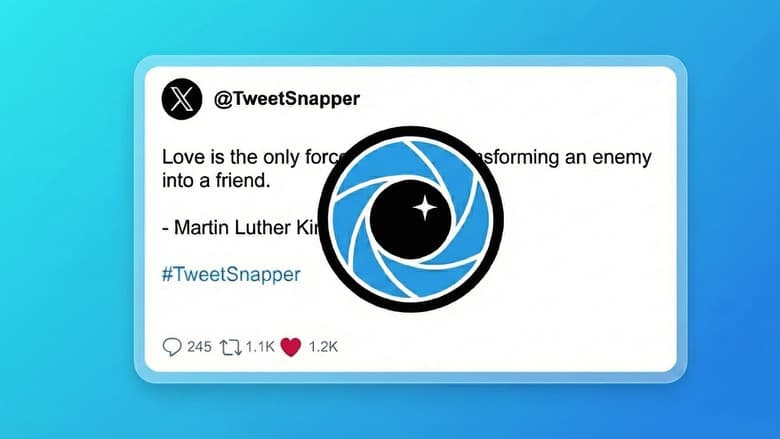
Discover TweetSnapper, a lightweight, open-source Chrome extension I built to capture clean, high-resolution screenshots of tweets instantly. Say goodbye to clutter!
Hey everyone! I'm super excited to share something I've been working on this weekend a Chrome extension called TweetSnapper. If you've ever found yourself wanting to share a tweet but struggled with getting a clean screenshot you know, without all the extra buttons, timestamps, and clutter then TweetSnapper is built just for you. It's a lightweight, easy to use tool that lets you capture beautiful, high resolution screenshots of tweets instantly. And the best part? It's completely open-source! I believe in sharing and building together, so all the code is available for anyone to check out, learn from, and even contribute to. Let's dive in and see what TweetSnapper is all about!
Key Features That Make TweetSnapper Shine
📸 Camera Icon on Every Tweet: a camera icon appears right next to every tweet you see on Twitter. It's perfectly integrated into the tweet's action bar, so it feels like it's always been there. No more searching for screenshot shortcuts or awkward cropping. Just a simple click, and you're halfway to your perfect tweet capture. It's designed for quick access and minimal interruption to your browsing experience, ensuring that when inspiration strikes, your capture tool is right there, ready to go.
✨ Clean & Minimal Output: TweetSnapper automatically strips away all these unnecessary UI elements. What you get is a pristine, clutter-free image of just the tweet itself. It's like having a professional studio photographer for your tweets, ensuring that the message and the content are the absolute stars, without any distractions.
🖼️ High-Resolution Exports: TweetSnapper delivers sharp, crisp PNG images. This means your captured tweets will look fantastic no matter where you share them on a high-definition monitor, embedded in a presentation.
🎨 Styled Capture Modal: This modal gives you a polished, distraction-free preview of your tweet capture. It's not just a simple preview; it's styled to make your tweet look its best. This allows you to see exactly what your screenshot will look like, giving you a chance to appreciate the clean output and confirm everything is just right before you save it to your computer.
⚡ One-Click Download: Once you're happy with the preview in the capture modal, saving your tweet screenshot is incredibly simple. It's a genuine one-click download process. Your captured tweet is ready for Instagram, LinkedIn, presentations, blog posts, or wherever else you need it, in a flash.
⚙️ Customizable Options (New!): Imagine being able to adjust the border-radius of your captured tweet, giving it a softer, more modern look if you prefer. Want to toggle whether the "likes" count or the "share count bar" is visible or hidden? You'll have that control too! . It’s about giving you more creative control without overwhelming you with complex settings.
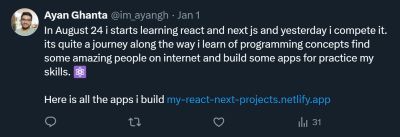
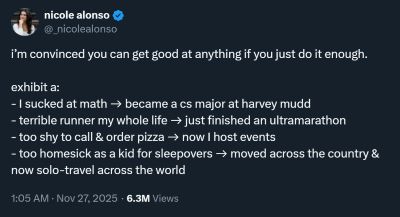
Some Snappes ✨📸
How It Works: The Magic Behind the Snaps
Ever wondered what happens behind the scenes when you click that little camera icon? Let me give you a peek into how TweetSnapper works its magic. It's a pretty neat process, and I've tried to keep it as efficient and robust as possible.
Injection: The first step is subtle but crucial. When you're browsing Twitter, TweetSnapper quietly injects a small camera icon directly into the action bar of every tweet you see. it's placed to be easily accessible without getting in your way.
Cloning: When you click that camera icon, TweetSnapper doesn't just take a picture of your screen. Instead. It identifies the specific tweet you clicked on and then creates a perfect copy, a clone of that tweet's entire set of DOM elements. Think of it as making a precise duplicate of the tweet's structure and content, but in a hidden, temporary space. This allows us to work with the tweet's elements without affecting your live Twitter feed.
Cleaning: This is where the "Snapper" part really shines! Once we have a clone of the tweet, the extension goes to work. It meticulously removes all the "noise" those unnecessary UI elements I mentioned earlier. This CSS gives it that polished, distraction free "studio look" you see in the preview modal. It's all about making the tweet itself stand out.
Rendering: Now that we have a super clean, beautifully styled HTML version of your tweet, the next step is to turn it into an image. For this, I use a fantastic library called
html-to-image. This library takes the cleaned HTML and renders it onto an HTMLcanvaselement. A canvas is like a blank digital drawing board where the HTML content is "painted" as pixels. This is a powerful way to convert web content into a graphical representation, maintaining all the styling and clarity.Export: Finally, once the tweet is perfectly rendered on the canvas, the extension converts that canvas content into a high-quality PNG image. PNG is chosen for its excellent quality and support for transparency, which is great for digital assets. This PNG image is then instantly downloaded directly to your device. And just like that, you have a professional grade screenshot of your tweet, ready for whatever you need it for!
The Tech Stack Powering TweetSnapper
I believe in using robust and efficient tools to build great software. For TweetSnapper, I've chosen a tech stack that balances performance, maintainability, and compatibility. Here’s a quick look under the hood:
Core: Vanilla JavaScript (ES6+): At the heart of TweetSnapper is plain, old, reliable JavaScript. I chose Vanilla JS (ES6+ features) because it's incredibly powerful, lightweight, and doesn't require any heavy frameworks. This keeps the extension fast, nimble, and ensures maximum compatibility across Chrome browsers. It allows for direct manipulation of the DOM and efficient handling of logic, keeping the codebase straightforward and easy to understand.
Platform: Chrome Extensions API (Manifest V3): TweetSnapper is built specifically for Chrome, leveraging the official Chrome Extensions API. I've developed it using Manifest V3, which is the latest version of the Chrome extension platform. Manifest V3 brings enhanced security,
Rendering: html-to-image (for DOM to PNG conversion): As mentioned in "How It Works," converting HTML elements into a high quality image is a critical part of TweetSnapper. For this, I rely on the excellent
html-to-imagelibrary. This JavaScript library is specifically designed to render HTML and SVG elements to a canvas, which can then be exported as various image formats like PNG. It handles all the complexities of rendering styles and layouts, ensuring that the captured tweet looks exactly as intended in the final image.Styling: CSS3 (Flexbox/Grid for modal layout): To make TweetSnapper's capture modal look clean, responsive, and aesthetically pleasing, I've used modern CSS3. Specifically, I've utilized Flexbox and CSS Grid for laying out the elements within the modal. These powerful CSS layout modules allow for flexible and efficient design, ensuring that the preview modal looks great on different screen sizes and provides a consistent "studio" experience. It's all about making the user interface intuitive and visually appealing.
Get Involved: Developer Setup & Contributions
As I mentioned, TweetSnapper is an open-source project, and I truly believe in the power of community collaboration. This means that I welcome contributions of all kinds! Whether you're an experienced developer looking to dive into Chrome extension development, a newcomer eager to learn, or just someone with a great idea, your input is incredibly valuable.
Here's how you can get involved:
Bug Fixes: Spotted a glitch or something not working quite right? Your help in identifying and fixing bugs would be amazing.
New Features: Have a brilliant idea for a new feature, like more customization options or a different export format? I'd love to hear it, and even better, see a pull request!
Suggestions: Maybe you have a suggestion for improving the user experience, the documentation, or even just a stylistic tweak. All feedback is welcome.
Documentation: Helping to improve the project's documentation, adding more examples, or clarifying explanations would also be a huge help.
Ready to jump in? You can find the entire project code on GitHub:
https://github.com/ayanghanta/tweet-snapper-chrome-extension
Important Note: TweetSnapper is currently not published on the Chrome Web Store. This means you'll need to manually install it to try it out and contribute. Don't worry, it's a straightforward process:
Clone or Download: Start by downloading or cloning the project files from the GitHub repository to your local machine. You can use in your terminal.
git clone https://github.com/ayanghanta/tweet-snapper-chrome-extension.gitBuild the Project: Navigate into the project directory and run
npm installto get all the necessary dependencies, then executenpm run build. This command will compile the source code and create adistfolder. Thisdistfolder contains the ready-to-use extension files.Load into Chrome:
Open Chrome and go to
chrome://extensions.Enable "Developer mode" by toggling the switch in the top-right corner.
Click the "Load unpacked" button.
Select the
distfolder you just created.
And that's it! TweetSnapper will now be loaded into your Chrome browser, and you can start snapping tweets. I'm really looking forward to seeing what we can build together!
Final Thoughts
Building TweetSnapper has been a really fun and rewarding journey, and I'm incredibly proud of what it can do. I never build a chrome extention before so i want to build a chorme extesion that little bit use full and solves a common frustration for anyone who uses Twitter and wants to share content cleanly. I hope you find it as useful as I do. Give it a try, explore the code, and feel free to reach out with any thoughts or ideas. Happy snapping! 📸